Arrays
Introduction to Arrays
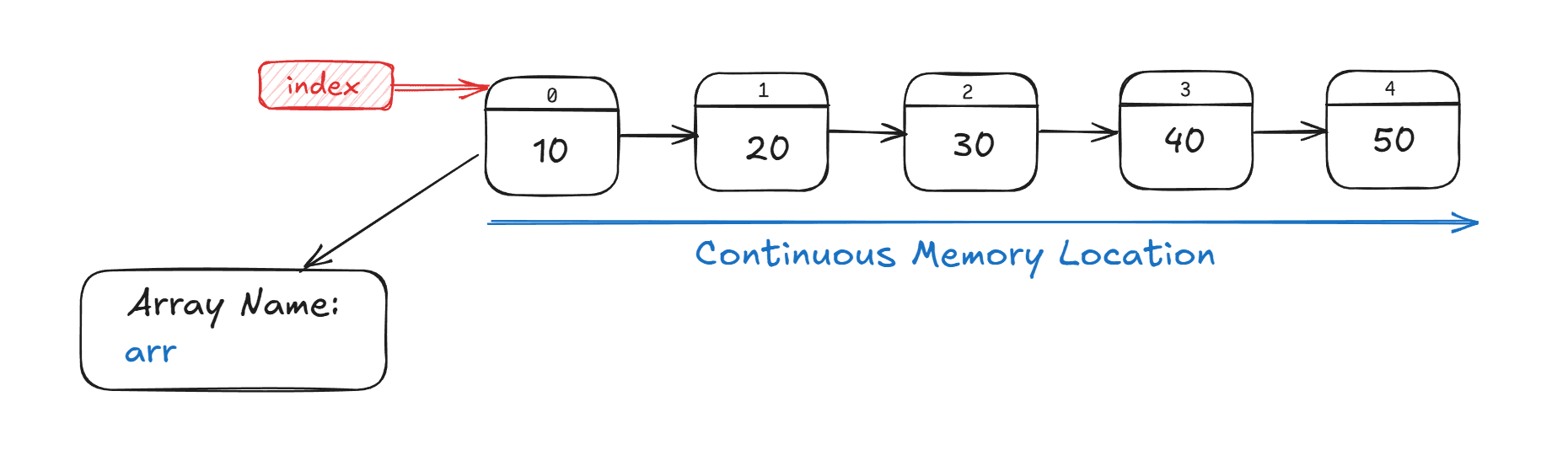
An array is a fundamental linear data structure that stores a collection of elements of the same data type in contiguous memory locations. Think of an array as a series of boxes placed next to each other, where each box can hold one piece of data, and every box is numbered starting from 0 (in most programming languages)
Each element in an array can be accessed directly using its index - a numerical value that represents the position of the element. The beauty of arrays lies in their simplicity: if you know the index of an element, you can access it instantly, regardless of the array's size.
Memory Layout and Storage
Arrays are stored in contiguous memory locations, meaning all elements are placed one after another in memory. This arrangement is crucial for understanding array performance characteristics
Memory Address = Base Address + ( Index × Size of Element)
For example, if an integer array starts at memory address 1000 and each integer occupies 4 bytes, the element at index 3 would be located at address 1000 + (3 × 4) = 1012.
This contiguous storage provides several advantages:
-
Cache Efficiency: Accessing one element brings neighboring elements into the cache, improving performance through spatial locality
-
Random Access: Direct access to any element in constant time O(1)
-
Memory Efficiency: Elements are stored in a single block, reducing memory fragmentation
Types of Arrays
One-Dimensional Arrays:
-
Elements arranged in a single row or column
-
Accessed using a single index
-
Example:
int[] numbers;
Multi-Dimensional Arrays:
-
Arrays of arrays, commonly 2D (matrices) or 3D
-
Accessed using multiple indices
-
Example:
int[][] matrix;for a m×n matrix
Time Complexity
| Operation | Time Complexity | Explanation |
|---|---|---|
| Access by index | O(1) | Direct access using index is constant time. |
| Insert at end (if space) | O(1) amortized | Adding at the end is usually constant time unless resizing occurs. |
| Insert/delete at start or middle | O(n) | Requires shifting elements, so linear time. |
| Search for element | O(n) | Linear search through the array. |
| Delete last element | O(1) | Simply removes the last element. |
| Resize array (when needed) | O(n) | Copying elements takes linear time. |
Benefits of Arrays
- Efficient and fast access to elements using an index
(O(1)time complexity). - Memory efficient as elements are stored in contiguous memory locations.
- Simple and easy to use for storing multiple values of the same data type.
- Support multi-dimensional arrays for complex data representation like matrices.
- Used as the underlying structure for implementing other data structures such as stacks and queues.
- Facilitate various algorithms like searching, sorting, and dynamic programming.
Limitations of Arrays
- Fixed size; the size must be defined at creation and cannot be changed dynamically.
- Insertion and deletion operations are costly
(O(n))due to the need to shift elements. - Can cause memory wastage if allocated size is larger than needed.
- Support only one data type per array, limiting flexibility.
- Expanding an array requires creating a new larger array and copying elements, which is time-consuming.
- Limited flexibility compared to dynamic data structures like linked lists.
- Lack of built-in bounds checking in some languages can lead to errors or unexpected behavior.
When to Use Arrays?
00
Fast Access Needs
Choose arrays when you need quick, direct access to elements using their index.
01
Known Size
Ideal when the number of elements is fixed or known ahead of time.
02
Uniform Data
Best suited for storing multiple values of the same data type.
03
Multi-Dimensional Data
Perfect for representing complex data structures like matrices or tables.
04
Foundation for Other Structures
Useful as the base for stacks, queues, and other data structures.
05
Algorithmic Operations
Great for tasks involving searching, sorting, or dynamic programming.
06
Efficient Memory Use
Stores data in contiguous blocks of memory for better performance.
07
Data Buffering
Effective for buffering or processing large streams of data requiring fast access.
Arrays provide a simple, efficient way to handle stable, predictable data where size and type consistency are expected.
How to Create an Array
Here is a simple example of how to create an array in different programming languages:
    // Integer array
    int[] numbers = {1, 2, 3, 4, 5};

    // String array
    String[] fruits = {"Apple", "Banana", "Cherry"};

    // Declaring with size (default values = 0 or null)
    int[] arr = new int[5]; // [0, 0, 0, 0, 0]
Common Patterns
Two Pointers
Use two indices to iterate over an array to find pairs or process elements efficiently, commonly used in sorted arrays, palindrome checks, or removing duplicates.
Sliding Window
Keep a running window over a subarray to optimize finding maximum/minimum sum, or subarrays/strings that meet certain criteria.
Overlapping Intervals
Merge, insert, or find intersections in arrays of interval pairs, commonly seen in scheduling or calendar problems.
Modified Binary Search
Apply binary search on sorted or rotated arrays, or to find boundaries, indexes, and satisfy specific conditions.
Cyclic Sort
Place elements in their correct indices in O(n) time for arrays containing numbers in a specific range, useful for finding missing or duplicate numbers.
Traversing from Right or Both Ends
Process arrays from one or both ends at once to simplify logic, often for merging problems or finding elements quickly.